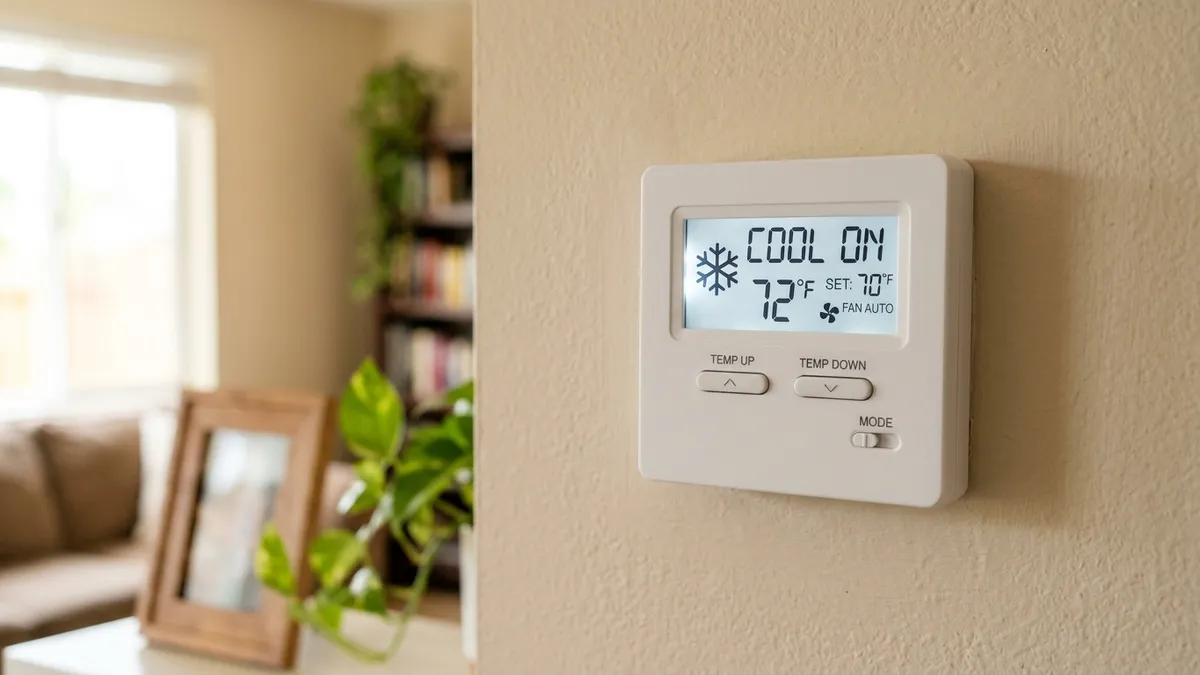
A flashing “Cool On” on a Honeywell thermostat almost always means the thermostat’s compressor protection delay is running. The thermostat is calling for cooling, but it’s holding the outdoor unit off for a few minutes so the compressor isn’t restarted too soon. It usually stops flashing and turns solid within about 5 minutes, and then the AC starts. If it keeps flashing much longer than that, or the display goes solid and the AC still doesn’t run, something else is going on.
Last updated: October 2026. Applies to most Honeywell and Honeywell Home digital thermostats; exact wording varies by model, so check your user guide.
What “Cool On” flashing means
Air conditioners and heat pumps need a short rest between cycles. When a compressor shuts off, the refrigerant pressure inside it takes a few minutes to equalize. Restarting it before that happens makes it strain against high pressure, which can trip its overload or wear it out early.
To prevent that, most Honeywell thermostats build in a minimum off-time. While that timer runs, the thermostat shows “Cool On” flashing. When the timer ends, “Cool On” turns solid and the thermostat sends the signal to start cooling. On a heat pump in heating mode you’ll see the same thing as “Heat On” flashing. Some newer models show a message such as “Wait” instead.
| What you see | What it means | What to do |
|---|---|---|
| “Cool On” flashing for up to about 5 minutes | Compressor protection delay | Nothing. Wait. |
| Flashing after a power outage or after changing settings | The delay restarted | Wait about 5 minutes without touching it |
| “Cool On” solid, but no cold air | Thermostat is calling, equipment isn’t responding | See the steps below |
| Flashing for 10+ minutes, or it keeps restarting | Thermostat is resetting or losing power | Check batteries, power and wiring |
| Display blank | Thermostat has no power | See thermostat blank screen |
Why the delay starts more often than you’d expect
The protection timer doesn’t only run after the AC shuts off. It also starts when:
- Power returns after an outage or a tripped breaker.
- You change the mode or setpoint, or switch the system off and on.
- You replace the batteries or the thermostat reboots.
That’s why a thermostat can show “Cool On” flashing right after you touch it, even if the AC has been off for hours. Every reset starts the countdown again, so the fastest fix is usually to leave it alone for 5 minutes.
How to fix “Cool On” flashing on a Honeywell thermostat
1. Wait 5 minutes
Don’t change settings or turn the system off and on during this time. Each change can restart the timer. If “Cool On” goes solid and the AC starts, the thermostat is working normally.
2. Check the mode and setpoint
Make sure the system switch is on Cool (or Auto) and the setpoint is at least 2 to 3 degrees below the room temperature. If the setpoint is above room temperature, the thermostat has no reason to call for cooling.
3. Replace the batteries
Many Honeywell models run on AA or AAA batteries, either as their only power or as backup. Weak batteries can make the thermostat reboot over and over, and each reboot restarts the delay. If your model shows a low-battery warning, or you can’t remember the last change, replace them with fresh alkaline batteries. If the screen also flickers or goes blank, see Honeywell thermostat not working.
4. Check the breakers and the outdoor disconnect
If “Cool On” turns solid but nothing happens outside, check the breaker for the outdoor unit and the furnace or air handler, and the disconnect box next to the outdoor unit. A tripped breaker is one of the most common reasons the AC doesn’t start after a storm. For a full reset sequence, see how to reset an AC unit.
5. Check for a tripped condensate safety switch
Many systems have a float switch on the drain pan or condensate line. When the drain clogs and water backs up, the switch cuts the cooling signal to protect your ceiling. The thermostat may still show “Cool On” while nothing runs. Look for standing water in the drain pan near the indoor unit and see AC condensate line clogged.
6. Replace a dirty air filter
A badly clogged filter can freeze the indoor coil, and some systems shut down on safety controls until it thaws. Check the filter and replace it if you can’t see light through it. See how often to change your air filter.
7. Check the wiring
With the power off at the breaker, remove the thermostat from its wall plate and make sure each wire is firmly seated in the right terminal. The Y wire carries the cooling call, R is power and C is the common wire. A loose R or C wire can make the thermostat reboot, and a loose Y wire means the AC never gets the signal. Use our thermostat wiring colors chart to check each terminal.
8. Reset the thermostat
If nothing else works, reset the thermostat to its factory settings. The steps vary by model and are in your user guide. After a reset you’ll need to set the system type (conventional AC or heat pump) again. A wrong system type can stop the AC from turning on even though the display says “Cool On”.
When it’s not the thermostat
If “Cool On” is solid, the breakers are on, the drain is clear, and you still get no cold air, the thermostat is doing its job and the problem is in the equipment. Common causes:
- Outdoor unit humming but the fan isn’t spinning: often a failed capacitor. See bad AC capacitor symptoms.
- Outdoor unit runs but the air inside is warm: dirty coil, low refrigerant or a failing compressor. See AC not cooling or blowing warm air.
- The AC starts and stops every few minutes: see AC short cycling.
When to call an HVAC technician
Call a licensed technician if:
- “Cool On” goes solid but the outdoor unit never starts, and the breakers and disconnect are on.
- The breaker trips again after you reset it.
- You see ice on the refrigerant lines, hear buzzing or clicking from the outdoor unit, or smell burning.
These usually point to electrical or refrigerant problems that need tools and training to fix safely.
Seeing “Recovery” instead? See Honeywell thermostat “Recovery” message.
Hear a click but nothing starts after the delay? See thermostat clicking but nothing happens.
Frequently asked questions
How long does “Cool On” flash on a Honeywell thermostat?
Usually up to about 5 minutes. If it keeps flashing for 10 minutes or more, or starts over every time you look at it, check the batteries, power and wiring.
Can I bypass the compressor delay?
On many Honeywell models the delay can’t be turned off, and it shouldn’t be. It protects the most expensive part of your AC. Some installer menus let a technician adjust it, but the few minutes you save aren’t worth the risk to the compressor.
Why does my Honeywell thermostat say “Cool On” but the AC isn’t running?
If “Cool On” is flashing, the AC is waiting out the delay. If it’s solid, the thermostat is calling for cooling and the problem is usually a tripped breaker, a float switch, a loose Y wire or a fault in the outdoor unit.
Does “Heat On” flashing mean the same thing?
Yes. On a heat pump, “Heat On” flashing is the same compressor protection delay in heating mode. On a gas furnace there’s no compressor, so a long flashing “Heat On” is less common; check the furnace itself, starting with furnace not turning on.
Disclaimer: this guide is for general information only. HVAC systems involve high voltage and refrigerant. When in doubt, contact a licensed HVAC professional.