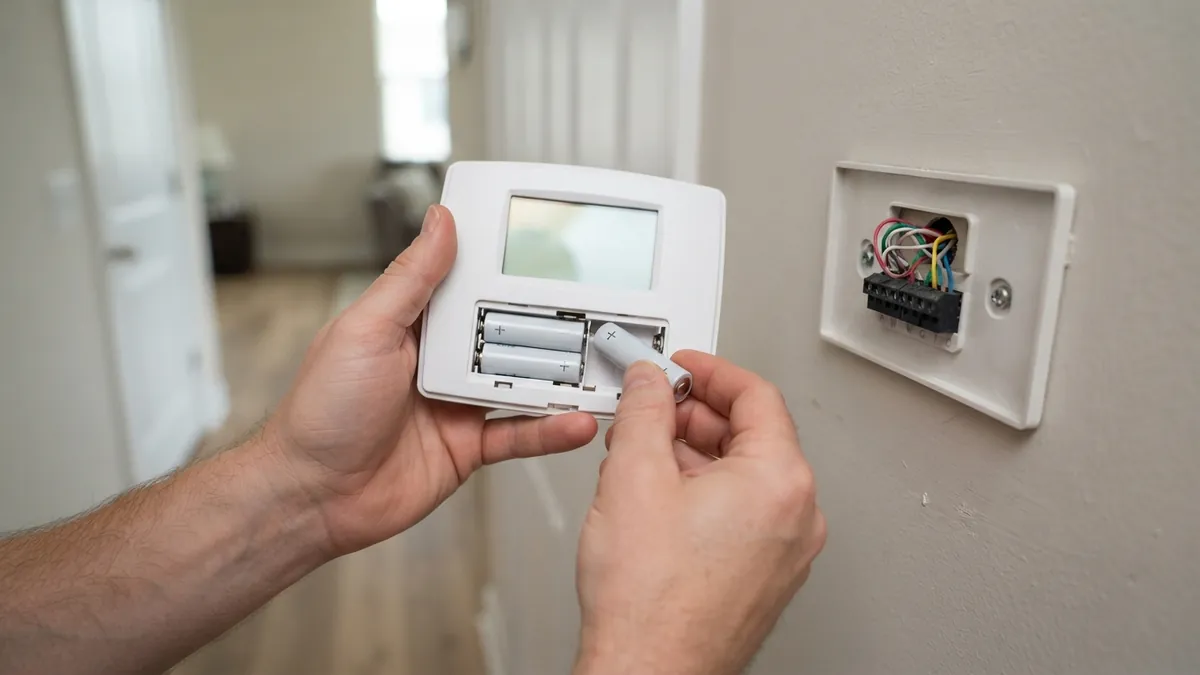
If your Honeywell thermostat isn’t working, start with the basics that apply to every model: replace the batteries (most Honeywell thermostats use AA or AAA batteries even when hardwired), check the furnace breaker and door switch, confirm the system switch is set to HEAT or COOL, and check whether a compressor protection delay (“Cool On” or “Heat On” flashing) is simply making you wait up to 5 minutes. Most problems are one of those.
Below are fixes by symptom, plus model-specific tips.
Fixes by symptom
| Symptom | Likely cause | What to do |
|---|---|---|
| Blank screen | Dead batteries, no power, blown furnace fuse, open door switch | See thermostat blank screen |
| “Cool On” or “Heat On” flashing | Compressor protection delay (normal, up to 5 minutes) | Wait 5 minutes |
| Display works, system doesn’t start | Wrong system setting, wiring, or HVAC equipment problem | Check settings and wiring; then the equipment |
| Temperature reading wrong | Location (sun, vent, drafts) or a dirty sensor | See where a thermostat should be placed |
| Heats when set to cool (heat pumps) | Wrong reversing valve (O/B) setting | Change the setting in the installer menu |
| Short cycling | Cycle rate setting, location, or system issue | See furnace short cycling or AC short cycling |
| Wi-Fi model offline | Router change, weak signal, or app login | Reconnect in the Resideo app |
Honeywell display messages explained
Many “not working” reports are really a message on the screen doing its job. Here’s what the most common ones mean:
| Message | What it means | What to do |
|---|---|---|
| “Cool On” or “Heat On” flashing | Compressor protection delay | Wait up to 5 minutes. See Honeywell “Cool On” flashing |
| “Wait” | Same compressor delay on newer models | Wait a few minutes |
| “Recovery” | Started early to reach the next scheduled temperature | Normal. See Honeywell “Recovery” message |
| “Em Heat” | Heat pump is using only backup heat | Switch back to Heat unless the outdoor unit is broken. See heat pump emergency heat |
| “Aux Heat” | Backup heat is helping the heat pump | Normal in cold weather or when raising the temperature a lot |
| “Hold”, “Temporary” or “Permanent Hold” | Your schedule is being overridden | Cancel the hold to return to the schedule |
| “Replace Batt” or a low battery icon | Batteries are low | Replace them with fresh alkaline batteries |
| “Filter” or “Replace Filter” | Filter reminder timer | Change the filter, then reset the reminder. See how often to change your air filter |
| “Locked” | Keypad lock is on | Unlock it with the code or the button combination in your manual |
Common wiring mistakes after installing a Honeywell thermostat
If the problem started right after a new installation, check these first, with the power off:
- R and Rc not connected on a single-transformer system. Many Honeywell thermostats have separate R and Rc terminals, joined by a jumper or a slider. If your system has one transformer (most homes) and only one red wire, R and Rc must be connected, or the thermostat may power up but never run the AC.
- No C wire on a Wi-Fi model. Wi-Fi and touchscreen models usually need a C wire for steady power. Without one, the screen can go blank or the thermostat can drop off Wi-Fi. See smart thermostat without a C wire.
- Wrong system type or O/B setting. If a heat pump heats when you want cooling (or the reverse), the reversing valve setting in the installer menu is wrong.
- Wires moved by color instead of letter. Always match the terminal letters from your old thermostat, not the wire colors. See our thermostat wiring colors chart.
Step-by-step troubleshooting
- Replace the batteries with fresh alkaline batteries.
- Check the system switch: HEAT, COOL or AUTO, not OFF or EM HEAT (unless intended).
- Set the temperature at least 3 to 5 degrees away from room temperature and wait 5 minutes.
- Check power: furnace breaker, furnace service switch, blower door closed, condensate float switch.
- Check wiring with power off: each wire firmly in its terminal, matching the letters from your old setup. See thermostat wiring colors.
- Check installer settings: system type (gas furnace, heat pump, electric), O/B setting, and cycle rate. Refer to the installation guide for your model; Honeywell Home (Resideo) publishes manuals online.
- Reset to factory settings only if needed; it erases schedules and installer settings.
Model-specific tips
- T-series (T4, T5, T6 Pro): installer settings are in the menu under “Installer Options” (often requires holding the menu button). Confirm the system type and the reversing valve setting for heat pumps.
- Wi-Fi models (T9, T10, older RTH series): many problems are app or network issues. Reconnect through the Resideo or Honeywell Home app after router changes.
- Older non-programmable models: often run only on batteries or on the 24-volt R and W wires; weak batteries are the top cause of problems.
The Honeywell Home brand is now owned by Resideo; support and apps are under the Resideo name.
When the thermostat is fine but the system isn’t
If the thermostat shows it’s calling for heat or cooling (for example “Heat On” steady) but nothing runs after 5 minutes, the problem is likely the HVAC equipment. Start with furnace not turning on or AC not cooling.
Seeing “Cool On” or “Heat On” blinking on the display? That’s usually a normal compressor delay. See Honeywell thermostat “Cool On” flashing.
Seeing “Recovery” on the display? That’s a normal scheduling feature, not a fault. See Honeywell thermostat “Recovery” message.
Frequently asked questions
How do I reset my Honeywell thermostat?
Remove the batteries for 30 seconds, or use the reset option in the menu. Factory resets vary by model; check the user guide.
Why does my Honeywell thermostat say “Cool On” but nothing happens?
A flashing “Cool On” usually means the compressor delay is active; wait 5 minutes. A steady “Cool On” with no cooling points to the AC equipment.
Do Honeywell thermostats need batteries if hardwired?
Many do, as backup to keep settings and the display. Replace them once a year.
Disclaimer: this guide is for general information only. Turn off power at the breaker before touching thermostat wiring. Contact a licensed HVAC professional for electrical diagnosis.
Why is my Honeywell thermostat on but not heating?
If the display shows “Heat On” steady and nothing happens after 5 minutes, the thermostat is usually doing its job and the furnace isn’t responding. Work through thermostat says heat on but no heat.